Tracking Number Shows No Information? The Real Reason Revealed
You just got a shipping confirmation email, tracking number included, and you did the thing everyone does: pasted it straight into the carrier’s website within minutes. Nothing. Your tracking number shows no information at all, not even a basic “label created” line. It feels like the number itself might be fake, or like something has already gone wrong before your package even left the building.
Here’s the reassuring truth: a tracking number shows no information far more often than people expect, and in the overwhelming majority of cases, it has nothing to do with a lost, fraudulent, or mishandled shipment. It comes down to a gap that exists in literally every carrier’s system, the gap between a label being created and a package actually being scanned. In this guide, we’ll break down exactly why a tracking number shows no information, how long that gap normally lasts, how to tell a genuine typo from a normal processing delay, and precisely what to do if the silence goes on too long.

The Short Answer
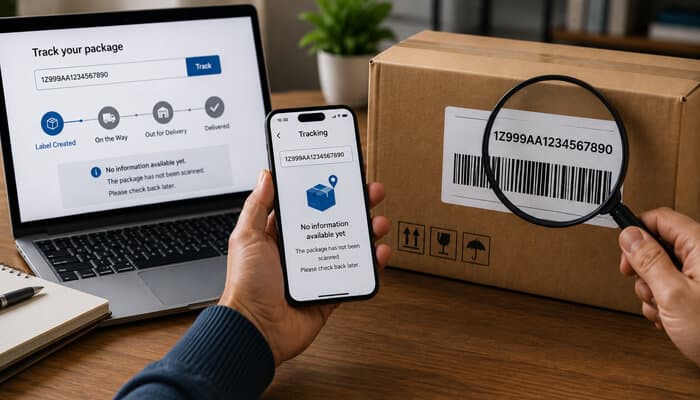
A tracking number shows no information most commonly because the shipping label has been created and transmitted to the carrier electronically, but the physical package hasn’t been scanned yet. Creating a label and physically scanning a package are two completely separate events, and the gap between them can range from a few hours to several days depending on the shipper, the carrier, and the time of year.
The Airline Reservation Analogy That Explains Everything
The clearest way to understand why a tracking number shows no information is to compare it to booking a flight. The moment you book, you get a confirmation number instantly, the airline’s system knows to expect you. But that confirmation number doesn’t mean you’re on the plane, it doesn’t mean you’re even at the airport yet. A shipping label works exactly the same way. As one detailed breakdown of the label-creation process explains, the carrier’s system generates a tracking number and a digital record often in under 200 milliseconds, before the package has been packed, before a truck has picked it up, and long before any physical scan has occurred. A tracking number shows no information for the exact same reason a flight confirmation shows no boarding data: the actual physical event that would generate that information simply hasn’t happened yet.
What Actually Happens Behind the Scenes When a Label Is Created
It’s worth understanding the technical sequence, because it explains just how large the gap between “label exists” and “package moving” can genuinely be. A seller’s shipping software sends a request to the carrier’s system, which instantly returns a tracking number and pre-registers the shipment. At that exact moment, a tracking number shows no information anywhere except “expected,” because the physical item is often still sitting in a pick-and-pack queue, sometimes hours away from even being boxed. High-volume fulfillment operations frequently generate hundreds of labels an hour well before the actual physical picking process for those orders even begins, meaning a label created at nine in the morning might not be scanned into a delivery truck until four that afternoon, or later. None of this reflects a problem with your specific order, it’s simply how modern label-printing software is built to work ahead of physical fulfillment.
The 7 Real Reasons a Tracking Number Shows No Information
1. The Label Was Just Created, and the Package Hasn’t Been Picked Up Yet
This is by far the most common explanation. Carrier pickups, especially for e-commerce sellers using scheduled daily pickups, can take 1 to 2 business days, longer in rural areas or around weekends and holidays. Until that physical pickup and first scan happens, a tracking number shows no information because there’s genuinely nothing to report yet.
2. The Initial Scan Was Missed at a Busy Facility
During high-volume periods, some sorting facilities intentionally skip the origin scan to keep trucks moving on schedule rather than slowing down the line for every individual package. When this happens, a tracking number shows no information right up until the package reaches its next major checkpoint, where a scan is finally logged.
3. The First Scan Doesn’t Happen Until a Regional Hub, Not at Origin
For bulk shipments, international mail, and certain discount shipping services, the very first scan is sometimes designed to happen only once a package reaches a regional sorting hub closer to its destination, not at the point of origin. In these cases, a tracking number shows no information for the entire first leg of the journey by design, not by error.
4. A System Propagation Delay
Occasionally, a package genuinely has been scanned, but that scan data hasn’t finished syncing to the public-facing tracking website yet. This is typically the shortest-lived cause, usually resolving within a few hours, and it means a tracking number shows no information purely due to a temporary display lag rather than anything physical.
5. A Typo or Mistyped Tracking Number
It’s worth ruling out the simplest explanation early: a single mistyped or mistakenly copied character will show a tracking number with no information at all, or an outright “not found” error, even though the real shipment is moving along completely normally.
6. A Secondary or “Final Mile” Tracking Number Exists
Some international shipments handled by DHL or handed off through a hybrid network generate a different, final tracking number partway through the journey. If you’re checking the original number after the handoff has occurred, a tracking number shows no information simply because you’re looking up the wrong one for that stage of the journey.
7. The Label Was Created but Never Actually Used
In rarer cases, a shipping label gets generated but the item is never physically dropped off, due to an out-of-stock situation, a canceled order, or in unfortunate cases, an attempt to fake proof of shipment. If a tracking number shows no information for more than about 7 days with zero communication from the seller, this becomes a real possibility worth investigating directly, a pattern documented extensively in USPS seller forums where packages sit unscanned for days before either suddenly appearing or being confirmed lost.
Common Myths About a Quiet Tracking Number, Debunked
Myth: If there’s truly no information, the tracking number must be fake.
A freshly generated tracking number showing no information is completely normal and does not indicate fraud on its own; genuine fraud is far more identifiable by a total lack of any communication or shipping confirmation at all, not simply a quiet tracking page.
Myth: The carrier is hiding something from you.
Carriers don’t selectively withhold tracking data. A tracking number shows no information because no scan event has occurred yet to generate data, not because information exists and is being deliberately concealed.
Myth: Calling customer service immediately will speed things up.
As one shipping industry breakdown of “stuck on label created” statuses notes, support agents typically see the exact same status you do and can’t manually force a scan to occur, so contacting them before the realistic waiting window has passed rarely produces new information.
Myth: Every carrier updates tracking on the same schedule.
Update frequency and the timing of the first meaningful scan vary meaningfully by carrier, service level, and shipping volume, which is exactly why the “normal” waiting window differs across the examples in this guide.
Myth: A tracking number that shows no information for a full day always means the seller is lying about shipping.
Genuine batch-processing delays, especially among sellers who print labels well ahead of physical pickup, routinely produce a full day or more of silence with no dishonesty involved whatsoever; the label-creation timestamp and the actual ship date are simply two different events.
How Long Is Normal Before You Should Actually Worry?
- Domestic shipments: 24 to 48 hours with no scan is common and not concerning. Up to 3 to 5 business days can still be within normal range depending on the carrier and pickup schedule.
- International shipments: A tracking number shows no information for up to a week in some cases, particularly with postal services that only perform the first meaningful scan at a regional hub.
- During peak shopping periods: Add several extra days of buffer, since sorting facility backlogs directly delay the first scan across the entire network, not just individual shipments.
- Beyond 7 to 10 days with zero movement: This is the point where it’s worth actively contacting the seller or carrier rather than continuing to wait.
Carrier-by-Carrier: What “No Information” Actually Looks Like
USPS: Typically shows “Label Created, Not Yet in System,” a status explicitly confirming USPS has the electronic data but not the physical package. USPS’s own tracking FAQ covers this and related statuses in detail through its official tracking support page.
FedEx: Usually displays “Shipment information sent to FedEx” before the first physical scan occurs, functionally identical to USPS’s pre-shipment status despite the different wording.
UPS: Commonly shows “Label Created” or “Order Processed,” and a tracking number shows no information beyond this until UPS physically receives and scans the package at pickup or drop-off.
DHL: International DHL shipments occasionally involve a secondary tracking number once the package is handed to a local delivery partner, which is why the original number can appear to go quiet even as the shipment continues moving normally under a different reference.
Why International Shipments Are Especially Prone to This
If you’re dealing with an international order, a tracking number shows no information for meaningfully longer stretches than a comparable domestic shipment, often by design rather than by error. Many postal services deliberately consolidate outbound international mail before performing any scan at all, meaning a package can physically leave the origin country, cross a border, and travel most of the way to its destination before generating its very first tracking update at a regional hub. This single design choice, prioritizing bulk processing speed over granular visibility on the earliest leg of the journey, accounts for a disproportionate share of “tracking number shows no information” reports specifically tied to cross-border shipments.
How to Tell a Typo From a Genuine Processing Delay
If a tracking number shows no information and also returns an explicit “invalid” or “not found” error rather than any status at all, even a pre-shipment one, that’s a strong signal of a typo or copy-paste error rather than a normal processing gap. A genuine pre-shipment delay almost always shows some status, even if minimal, like “label created,” rather than a flat error message. When in doubt, go back to the original confirmation email and carefully re-copy the number character by character rather than retyping it manually.
What to Do When a Tracking Number Shows No Information
- Re-check the number directly from the source, copying and pasting from the confirmation email rather than retyping it manually.
- Wait the realistic benchmark window for your specific shipment type before assuming anything is wrong.
- Check whether the carrier’s own status page shows any of the “pre-shipment” family of statuses, which confirms the label exists even without movement yet.
- Contact the seller directly if the tracking number shows no information well beyond the normal window, since they can confirm whether the item was actually shipped.
- Ask specifically whether a secondary tracking number exists, particularly for international or DHL-involved shipments.
- Sign up for carrier text or email alerts so you’re notified the moment the first real scan occurs, rather than manually refreshing.
- Use a consolidated tracking tool like SwiftGrid Express to check a shipment’s status across carriers in one place, which helps confirm whether a number is simply pending its first scan or genuinely invalid.
When “No Information” Actually Means the Label Was Abandoned
If a tracking number shows no information for well over a week, with no scan of any kind and no response from the seller, it’s reasonable to treat the shipment as likely never actually dropped off. This happens more often than people assume, sometimes due to an honest inventory mistake, sometimes due to a canceled order that wasn’t properly communicated, and in rare but real cases, as evidence in a dispute over whether an item was ever shipped at all. If you paid by credit card or through a marketplace with buyer protection, this is exactly the kind of documented gap, a valid label that never generated a single scan, that supports a legitimate refund claim.
For Sellers: Reducing “No Information” Complaints From Customers
If you run an online store, a tracking number showing no information is one of the most common sources of “where is my order” customer service tickets, even when nothing has actually gone wrong. A few practices help significantly:
- Set customer expectations in your shipping confirmation email, explicitly noting that tracking can take 24 to 48 hours to populate after a label is created.
- Batch label creation and drop-off as close together as possible, minimizing the window where a tracking number shows no information for reasons entirely within your control.
- Choose carriers with reliable origin scanning for time-sensitive orders, since some services are more prone to skipping the initial scan during high-volume periods than others.
- Proactively flag any label older than 3 to 4 days with zero scans as a red flag on your own end, before the customer has to bring it to your attention.
- Reference USPS’s own guidance on the “Label Created, Not Yet in System” status in your customer-facing help documentation, since pointing customers to an authoritative explanation reduces repeat support inquiries about the same normal delay.
A Real Example
Here’s a scenario that plays out constantly. A customer orders a birthday gift and receives a shipping confirmation with a tracking number attached. They check it immediately, tracking number shows no information whatsoever, not even a pre-shipment status. Understandably, they panic, assuming the order was never actually processed.
What actually happened: the seller creates shipping labels in a batch each morning but doesn’t physically drop off packages at the carrier facility until early afternoon. The customer checked the tracking number about ninety minutes after the confirmation email went out, well before the physical drop-off had even occurred. By that evening, the same tracking number showed a completed pickup scan and was moving normally. The tracking number showed no information for less than half a day, entirely because of the normal, everyday lag between label creation and physical handoff.
How SwiftGrid Express Helps When a Tracking Number Shows No Information
Not knowing whether a quiet tracking number means “just wait” or “something’s actually wrong” is genuinely the most frustrating part of this entire situation. SwiftGrid Express consolidates tracking data across USPS, FedEx, UPS, DHL, and regional partners into a single dashboard, so you can quickly compare how long a specific tracking number shows no information against what’s genuinely normal for that carrier and service level. You can check a shipment’s current status through SwiftGrid Express at any point. And if your shipment has already moved past this stage but seems to have stalled somewhere in the network, our guides on package tracking that hasn’t updated in days, why packages get stuck in transit, and what happens when a shipping company loses a package silently cover exactly what to check next at each later stage of a shipment’s journey.
Frequently Asked Questions
Is my package lost if the tracking number shows no information?
Almost certainly not. In the vast majority of cases, this simply means the physical package hasn’t been scanned yet, even though the label and tracking number already exist in the carrier’s system.
How long can a tracking number show no information before I should worry?
Generally 24 to 48 hours for domestic shipments and up to a week for international ones is still within normal range. Beyond 7 to 10 days with zero movement, it’s reasonable to start actively investigating.
Why does my tracking number show no information but the seller says it shipped?
This is usually a timing issue, the seller created the label and sent the confirmation email before the physical package was actually picked up and scanned by the carrier, which can take a day or two.
Could a tracking number showing no information mean I was scammed?
It’s possible in rare cases, particularly if the number never generates any scan at all after a week or more with no seller response, but the vast majority of instances resolve normally once the first scan occurs.
Does international shipping make this more common?
Yes. Many international and postal-partner services deliberately don’t perform a meaningful first scan until the package reaches a regional hub, which can be several days into the journey.
What’s the fastest way to tell if I just mistyped the tracking number?
If the carrier’s site returns an outright “not found” or “invalid” error rather than any status at all, even a minimal pre-shipment one, a typo is the more likely explanation.
Do all carriers show the same “no information” status?
No. USPS typically shows “Label Created, Not Yet in System,” FedEx shows “Shipment information sent to FedEx,” and UPS shows “Label Created” or “Order Processed,” all describing the same essential pre-scan gap with different wording.
Should I contact the seller immediately if tracking shows nothing?
Not immediately. Give it the realistic benchmark window first, since most cases resolve on their own within a day or two as the package moves through normal processing.
Can high shipping volume alone cause a tracking number to show no information?
Yes. During peak periods, some facilities deliberately skip the origin scan to keep processing lines moving quickly, meaning a tracking number can show no information purely due to volume, with no error involved at all.
Is it normal for two identical packages shipped the same day to update at different speeds?
Yes, surprisingly often. Even packages prepared identically and shipped together can be scanned at different points in a facility’s workflow, so one may show tracking data well before the other does, a pattern frequently discussed in seller community forums where sellers report batches of identically packaged shipments updating on completely different timelines.
Quick Reference: Is Your Situation Normal?
- Under 48 hours, domestic shipment: Completely normal. No action needed.
- 2 to 5 days, domestic shipment, no scan at all: Still within a reasonable range; check for a pre-shipment status before assuming a problem.
- Up to 7 days, international shipment: Often normal, particularly for postal services that batch-scan at a regional hub rather than at origin.
- Beyond 7 to 10 days with zero scans and no seller response: Time to actively investigate, contact the seller, and consider whether the label may have been abandoned.
- An outright “invalid” or “not found” error rather than any status: Likely a typo, re-copy the number directly from the original confirmation email.
Final Thoughts
A tracking number shows no information far more often than most people realize, and in the overwhelming majority of cases, it simply reflects the ordinary gap between a label being created and the physical package actually being scanned for the first time. Understanding that distinction, and knowing the realistic windows for when to actually start worrying, turns a moment of panic into a simple, well-informed wait. If you’d rather see a shipment’s real status at a glance instead of guessing whether “no information” is normal or not, SwiftGrid Express gives you that clarity the moment you need it.